
🗣 Learn / Rehearse
How do I import and rehearse my play ?

Do you want to repeat an original play that is not available in the Imparato Library ?
You have two options:
- Import a PDF file, then finalize its processing in the editor interface
- Copy or paste your play in the editor interface
Import your play
- Log in to the Imparato website if you have not already done so
- At the top of the screen, click on the Create button then Create a text.
From a file
- Your file must be in PDF format and contain readable play
- Select the mode I have a PDF text if it is not already the case
- Fill its title, the author, select your file then click on Continue.
💡To get compatible PDF from a paper play, we recommend a free mobile scanning app
The play will be extracted from your file and then pre-processed so you can edit and vocalize it from Imparato editor interface.
- Click on Ready to vocalize? and follow steps
Type your play
If you do not have a PDF file, you can type the text yourself.
- Select the mode I type my text.
- Fill the title, author then click on Continue.
- A draft will be created with a sample play in Imparato format, allowing vocalization.
- Type or your text following the example, or paste and convert to the Imparato syntax a Word or Pages document
- Click on Ready to vocalize? and follow steps
You can import a PDF file from the mobile app and then process it on the website.
To enter your text or paste it from a document (Word, Pages…), go directly to the website www.imparato.io.
💡 Your PDF file must contain text. To get PDFs compatible with the system from your paper documents, we recommend using a free mobile scanning app.
- Press the Import button at the bottom of the screen
- Select your PDF file
- Choose which company to import this text into, or leave it as My texts if you want to keep it to yourself
- Enter the name of the play and its author
- Confirm
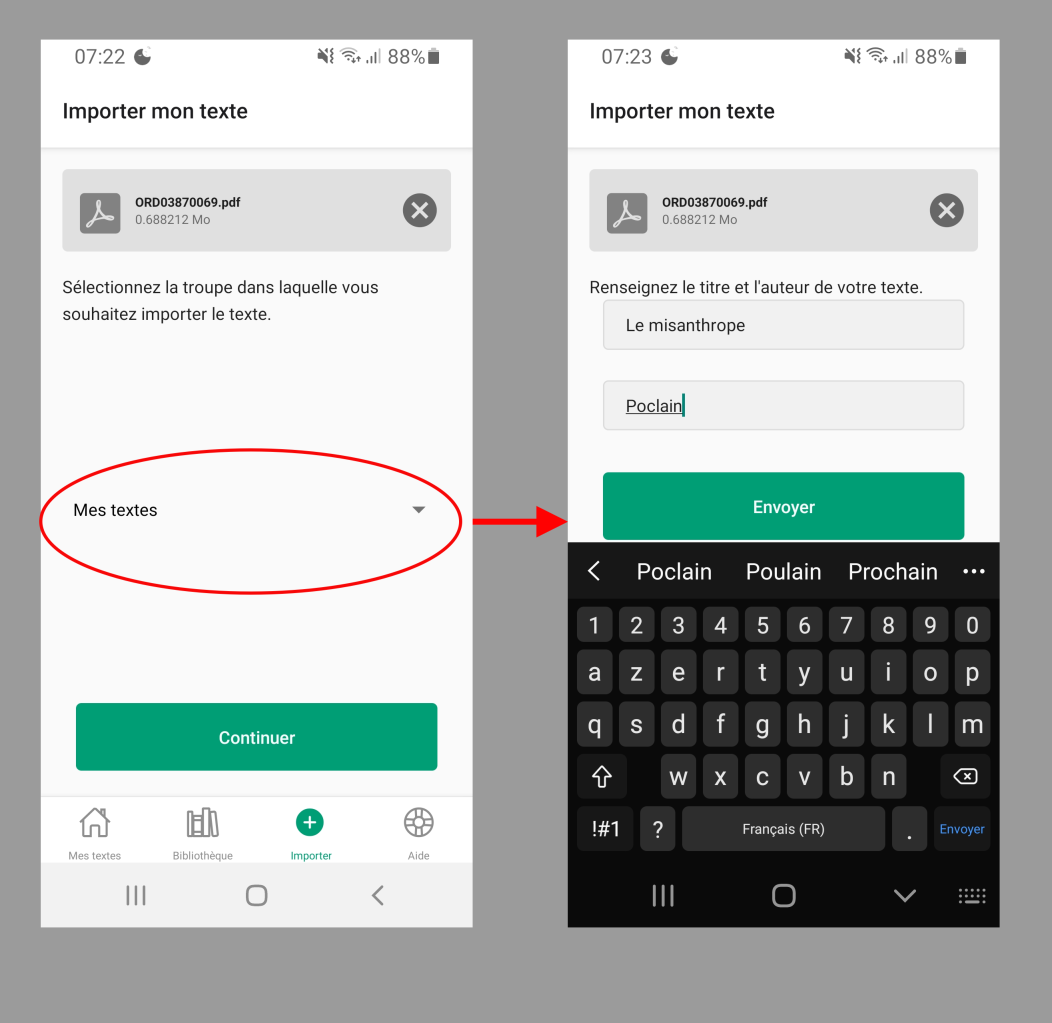
- Imparato will prepare your text extracted from the file, identifying characters, lines, … This step can take up to 30 seconds (plus the time it takes to upload your file)
Correct the text and start the vocalization on the website www.imparato.io
- The text finalization phase is only possible from a computer on www.imparato.io (using the same login details as the app).
- Make any necessary corrections to the text; there may be warnings or errors to fix. For more details on this stage, check out our help guides on getting started with the text correction tool and editing a text.
- Don't worry if everything isn't perfect, you can also correct your text later (you just need to remove any errors)
- When you're finished, click Ready to vocalize?
- Assign each role its gender Male or Female
- Start the vocalization. This step can take from a few minutes to nearly an hour depending on the length of the text
- You will receive an email once the vocalization is complete, when the text is ready to rehearse on the website and in the app
- Well done, you've imported your first text!