
How to remove a text

How to delete a text?
- Log in to the Imparato site with your credentials if you aren't logged in yet.
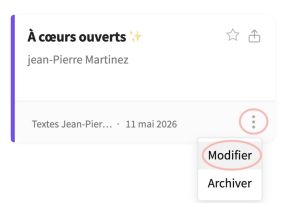
Click on the 3-dot menu at the bottom right of the card for the text you want to delete, then on Edit
⛔️ If the Edit option doesn't appear, it's because you are a member of a company and you don't have permission to edit/delete a company text.
👉 Contact the company owner so they can authorize you to edit/delete texts by granting you administrator status within the company.The next screen offers, among other things, to Delete the text or Archive it
Click on Delete
To delete a text from the app:
- In the list of texts, tap on your text.
- Go to the text settings
- Select "Delete this text" at the very bottom of the settings.
⛔️ If the delete button doesn't appear in the settings, it's because you are a member of a company and you don't have permission to delete a company text.
👉 Contact the owner or an administrator of the company to delete the text, or to have them make you a company administrator.